Setting up a Backpack Electrofisher to Capture Larval Lamprey
Detecting larval lamprey can be difficult. Smith-Root’s backpack electrofishers are scientifically proven to increase your odds of capturing larval lamprey when using specialized lamprey settings (Dunham et al. 2013).
Juvenile lamprey live in fine sediment. Under typical electrofishing settings, larval lamprey can become immobilized within the sediment, therefore reducing detection capabilities (Thompson et al. 2010).
Specialized lamprey settings provide two channels of electrofishing settings to increase detection and capture capabilities. The primary channel is unique and promotes lamprey movement out of the sediment. A secondary channel, activated by the user by releasing and quickly pressing the anode pole switch, is similar to typical electrofishing settings and aids in capture once the lamprey is out of the sediment.
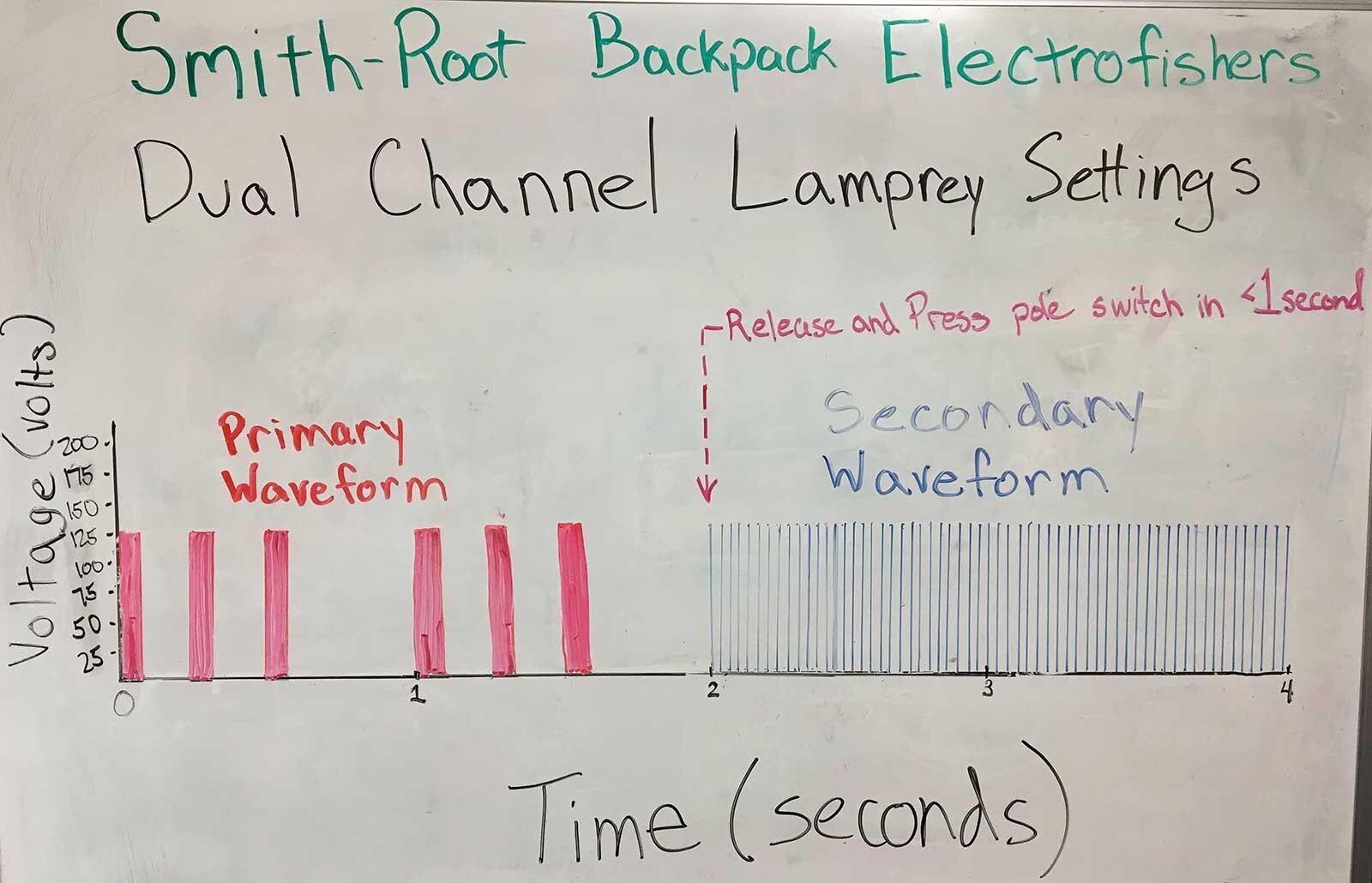
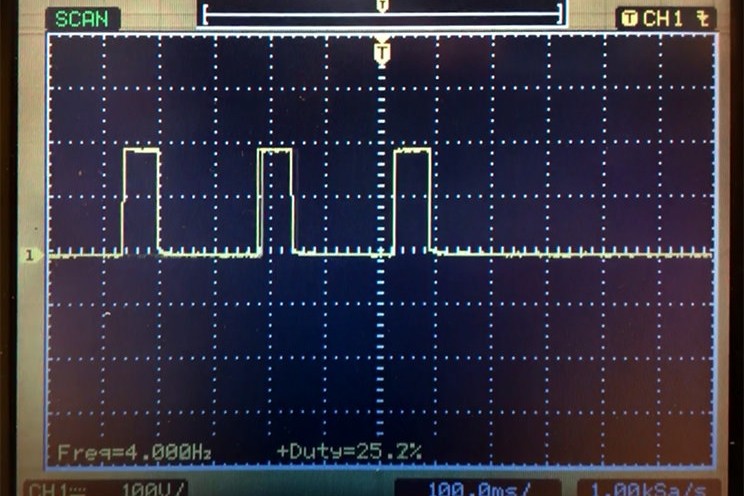
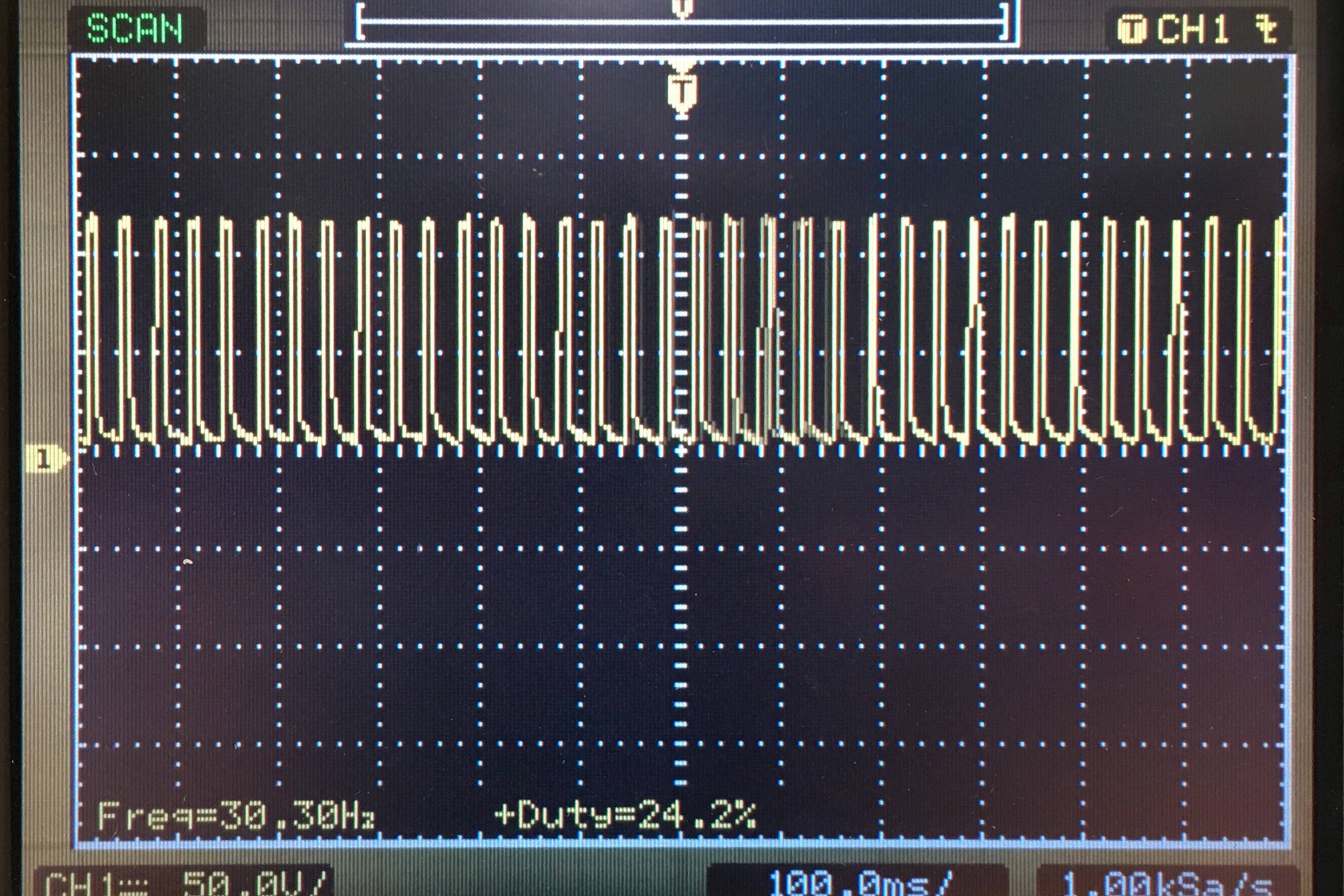
The Primary Waveform in the lamprey settings consists of a burst of 3 pulses and a short gap every second. The low pulse frequency and short gap of the Primary Waveform allow lamprey to move out of the sediment, whereas the higher frequency and consistent delivery of electricity in the Second Waveform allows the user to capture the ammocoetes with a net.
The LR-24 and Apex backpack electrofishers are the optimal pieces of scientific equipment for capturing larval lamprey. Watch the videos and follow the steps to set up and save the settings now so that you can easily recall these optimal settings in the field.
How To Set Up The LR-24 Backpack Electrofisher
Turn on Dual Channel Mode
<ol>
    <li>Press <kbd>MENU</kbd>.</li>
    <li>Press <kbd>UP ARROW</kbd> until <code>Enable Dual Channel?</code> option is on screen. Press <kbd>ENTER</kbd>.</li>
</ol>
<h3 class="h5">Primary Channel Setup</h3>
<ol start="3">
    <li>Press <kbd>PULSE TYPE</kbd>.</li>
    <li>Press <kbd>UP ARROW</kbd> until <code>Primary Pulse Type: Burst of Pulses</code> option is on screen. Press <kbd>ENTER</kbd>.</li>
    <li>Press <kbd>VOLTS</kbd>.</li>
    <li>Press <kbd>ARROWS</kbd> until you reach desired voltage depending on environmental conditions. 125 Volts is common starting point.  Press <kbd>ENTER</kbd>.</li>
    <li>Press <kbd>FREQ</kbd>.</li>
    <li>Press <kbd>DOWN ARROW</kbd> until you reach 1 Hz.  Press <kbd>ENTER</kbd>.</li>
    <li>Press <kbd>DUTY CYCLE</kbd>.
        <ol type="a">
            <li>Press <kbd>ARROWS</kbd> until <code>Primary Pulses/Burst</code> = 3.  Press <kbd>ENTER</kbd>.</li>
            <li>Press <kbd>ARROWS</kbd> until <code>Primary Burst Frequency</code> = 4 Hz.  Press <kbd>ENTER</kbd>.</li>
            <li>Press <kbd>ARROWS</kbd> until <code>Burst Duty Cycle</code> = 25%.  Press <kbd>ENTER</kbd>.</li>
        </ol>
    </li>
</ol>
<h3 class="h5">Secondary Channel Setup</h3>
<ol start="10">
    <li>Press <kbd>UP ARROW</kbd> until <code>Secondary Waveform</code> is displayed.</li>
    <li>Press <kbd>PULSE TYPE</kbd>.</li>
    <li>Press <kbd>UP ARROW</kbd> until <code>Secondary Pulse Type: Standard Pulse</code> option is on screen. Press <kbd>ENTER</kbd>.</li>
    <li>Press <kbd>VOLTS</kbd>.</li>
    <li>Press <kbd>ARROWS</kbd> until you reach desired voltage depending on environmental conditions. 125 Volts is common starting point.  Press <kbd>ENTER</kbd>.</li>
    <li>Press <kbd>FREQ</kbd>.</li>
    <li>Press <kbd>ARROWS</kbd> until you reach desired frequency. 30 Hz is common starting point. Press <kbd>ENTER</kbd>.</li>
    <li>Press DUTY CYCLE.</li>
    <li>Press <kbd>ARROWS</kbd> until you reach the desired Duty Cycle. 25% is a common starting point. Press <kbd>ENTER</kbd>.</li>
</ol>
<h3 class="h5">Store the Dual Channel Settings</h3>
<ol start="19">
    <li>Press <kbd>STORE SETUP</kbd>.</li>
    <li>Press <kbd>ARROWS</kbd> to choose the desired storage location. Press <kbd>ENTER</kbd>.</li>
</ol>
<h3 class="h5">Recall the Dual Channel Settings</h3>
<ol start="21">
    <li>Press <kbd>RECALL SETUP</kbd>.</li>
    <li>Press <kbd>ARROWS</kbd> to find the stored settings. Press <kbd>ENTER</kbd>.</li>
</ol>
How To Set Up The Apex Backpack Electrofisher
<h3 class="h5">Turn on Dual Channel Mode</h3>
<ol>
    <li>Press <kbd>MENU</kbd>.</li>
    <li>Activate Dual Channels. Press <kbd>BACK</kbd>.</li>
</ol>
<h3 class="h5">Primary Channel Setup</h3>
<ol start="3">
    <li>Press <kbd>WAVEFORM</kbd>.</li>
    <li>Activate “Burst” waveform. Press <kbd>BACK</kbd>.</li>
    <li>Press <kbd>OUTER/INNER</kbd>.</li>
    <li>Press <kbd>ARROWS</kbd> to reach 1 Hz Outer.</li>
    <li>Press <kbd>SELECT</kbd>.</li>
    <li>Press <kbd>ARROWS</kbd> to reach 4 Hz Inner. Press <kbd>BACK</kbd>.</li>
    <li>Press <kbd>DUTY/PULSES</kbd>.</li>
    <li>Press <kbd>ARROWS</kbd> to reach 25% Duty.</li>
    <li>Press <kbd>SELECT</kbd>.</li>
    <li>Press <kbd>ARROWS</kbd> to reach 3x Pulses. Press <kbd>BACK</kbd>.</li>
    <li>Press <kbd>VOLTAGE</kbd>.</li>
    <li>Press <kbd>ARROWS</kbd> until you reach desired voltage depending on environmental conditions. 125 Volts is common starting point. Press <kbd>BACK</kbd>.</li>
</ol>
<h3 class="h5">Secondary Channel Setup</h3>
<ol start="15">
    <li>Press <kbd>WAVEFORM</kbd>.</li>
    <li>Press <kbd>EDIT SECONDARY</kbd>.</li>
    <li>Press <kbd>WAVEFORM</kbd>.</li>
    <li>Activate “Pulse” waveform. Press <kbd>BACK</kbd>.</li>
    <li>Press <kbd>VOLTAGE</kbd>.</li>
    <li>Press <kbd>ARROWS</kbd> until you reach desired voltage depending on environmental conditions. 125 Volts is common starting point. Press <kbd>BACK</kbd>.</li>
    <li>Press <kbd>DUTY CYCLE</kbd>.</li>
    <li>Press <kbd>ARROWS</kbd> until you reach the desired Duty Cycle. 25% is a common starting point. Press <kbd>BACK</kbd>.</li>
    <li>Press <kbd>FREQUENCY</kbd>.</li>
    <li>Press <kbd>ARROWS</kbd> until you reach desired frequency 30 Hz is common starting point. Press <kbd>BACK</kbd>.</li>
</ol>
<h3 class="h5">Store the Dual Channel Settings</h3>
<ol start="25">
    <li>Press <kbd>WAVEFORM</kbd>.</li>
    <li>Press <kbd>FAVORITES</kbd>.</li>
    <li>Press <kbd>+</kbd>.  Press <kbd>BACK</kbd>.</li>
</ol>
<h3 class="h5">Recall the Dual Channel Settings</h3>
<ol start="28">
    <li>Press <kbd>WAVEFORM</kbd>.</li>
    <li>Press <kbd>FAVORITES</kbd>.</li>
    <li>Find and activate Dual Channel settings. Press <kbd>BACK</kbd>.</li>
</ol>
As always, give us a call (360) 573-0202 or write us at expert@smith-root.com if you have any questions.
This one page attachment to Thompson et al. (2010) is an excellent source of information for designing a field study using the Dual Channel Lamprey Settings. Electrofishing Recommendations for Sampling Larval Pacific Lampreys
References
Dunham, J. B., Chelgren, N. D., Heck, M. P., and Clark, S. M. 2013. Comparison of Electrofishing Techniques to Detect Larval Lampreys in Wadeable Streams in the Pacific Northwest. North American Journal of Fisheries Management, 33: 1149–1155. doi:10.1080/02755947.2013.826758
Thompson, K., Brostrom, J. K., Wang Luzier, C. 2010. Best Management Practices to Minimize Adverse Effects to Pacific Lamprey (Entosphenus tridentatus). USDA Forest Service, USDI Fish and Wildlife Service, USDI Bureau of Land Management. 25 pp. (https://semspub.epa.gov/work/10/100016741.pdf)